⏳ You're seeing this at ₹99. Price locks in for 06:37 — after that it goes to ₹299.
Real data · Real screenshots · No BS

This is exactly how I got
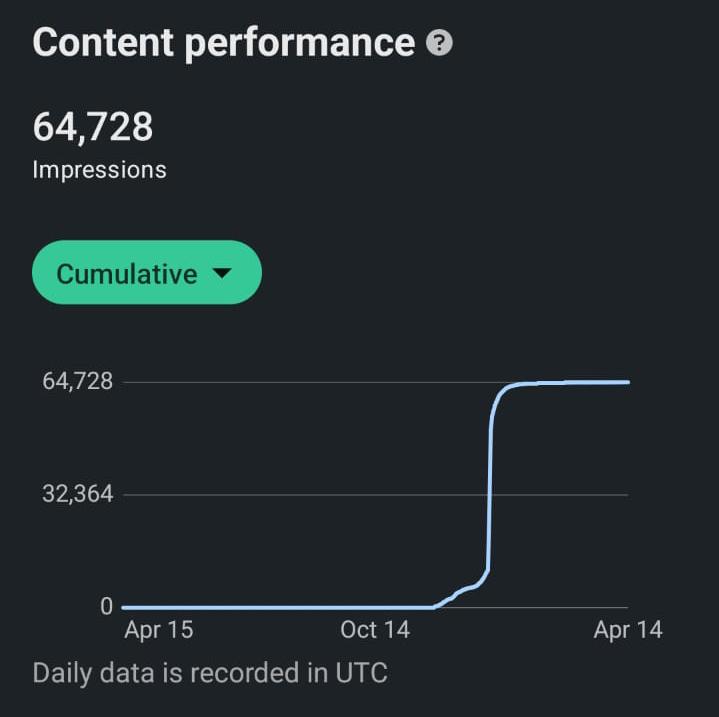
60,000+ impressions
in 2 weeks on LinkedIn.

I didn't write a single post.
An AI did everything. Every day. On autopilot.

View Proof Get Now
64,728
Total Impressions
2 Weeks
Time to Grow
0
Posts Written Manually
100%
Autopilot

Actual dashboard screenshots — unedited
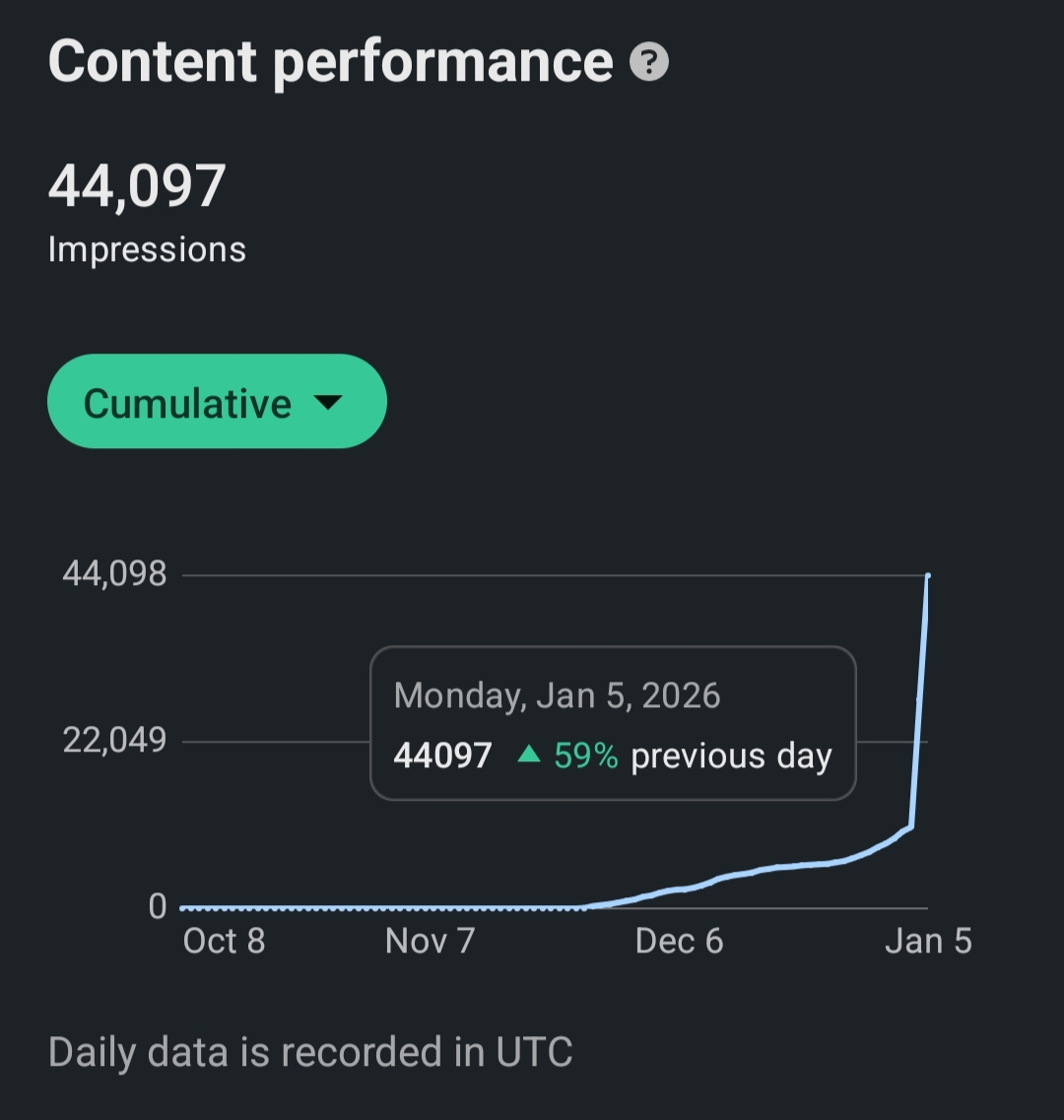
44,097 impressions — Jan 5 2026
44K in first sprint ↗
64,728 total impressions
64K+ total ↗

What early buyers are saying.

"Set this up on a Sunday afternoon. By Monday it had already drafted and queued 7 posts. I haven't touched LinkedIn manually since. Insane value for ₹99."

Rohan M.
Founder, SaaS startup

"I was skeptical — I've tried AI writing tools before and they all sound robotic. This one actually learned my tone. My audience has no idea. Impressions up 3x in the first week."

Priya S.
Marketing Consultant

"The setup guide is genuinely beginner-friendly. I'm not technical at all and I had it running in under an hour. The n8n walkthrough is clear and the support team replied within a day."

Aman K.
Personal Brand Coach


Get instant access

LinkedIn AI Autopilot

One workflow. Daily posting. Thousands of impressions. On autopilot.

99 one-time · instant download
Please enter your name
Please enter a valid email
Enter a valid mobile number for your country

Secured by Razorpay · 256-bit SSL
🛡️Secured by Razorpay
🔧Can't set it up? We will
🔒Instant download + delivery to your inbox

The workflow

Here's what the AI does.
Every. Single. Day.

Set it up once. It runs forever. No writers. No managers. No stress.

Step 01

🔍

Finds your competitors' best posts

The AI scans the top creators in your niche. It picks the posts that got the most reach and engagement. Not guessing — pure data, every time.

Step 02

🧠

Researches the topic deeply

It doesn't just copy. It reads the topic. Finds the angles. Digs into what your specific audience actually cares about. Then it thinks before it writes.

Step 03

✍️

Rewrites in your voice

You give it your tone, your style, your audience. It rewrites to sound exactly like you — not like a robot. People won't be able to tell the difference.

Step 04

🎨

Generates images for every post

Posts with visuals get 3× more reach. The AI generates custom, on-brand images automatically. Beautiful. Relevant. Zero extra work from you.

Step 05

📅

Posts on a schedule. Every day.

It queues everything and posts at the best times. While you sleep. While you work. While you do literally anything else. Completely hands-off.

Result

📈

You grow. Without lifting a finger.

Consistent daily posting = LinkedIn loves you. More reach. More followers. More leads. Zero extra hours from you. That's the whole point.


What's inside

Everything you need.
Nothing you don't.

⚙️

n8n Workflow File

The full automation. Import into n8n. Running in 10 minutes.

📄

Setup Guide PDF

Step-by-step. No tech skills needed. Just follow along.

💬

Prompt Templates

The exact prompts that make the AI write in your voice.

🔑

API Setup Walkthrough

Which keys you need. Where to get them. How to plug them in.

♾️

Lifetime Access

Buy once. Keep forever. Free updates when the workflow improves.

📩

Email Support

Stuck on setup? Email us. We'll get you running.


Questions we get asked a lot.

No. The setup guide walks you through every step with screenshots. If you can follow instructions and copy-paste, you can set this up. Most people are running within an hour.
You need an n8n account (free to self-host, or ~$20/month on n8n Cloud), an OpenAI API key, and optionally an image generation API (like DALL·E or Stability AI). The API Setup Walkthrough inside tells you exactly where to get each one.
The workflow posts through LinkedIn's standard scheduling — the same way any social media scheduler works. It does not use bots, fake engagement, or anything that violates LinkedIn's terms. You're posting real, original content on a schedule. Thousands of creators do this.
Yes — if you set it up correctly. You give it your writing style, your tone, your audience, and examples of your best posts. The prompts are specifically designed to replicate a human voice. We recommend reviewing posts before they go live until you've tuned it to your liking.
Most people finish in 45–90 minutes following the step-by-step guide. If you get stuck, email us and we'll help you through it.
Email us at autoscale.support@gmail.com. If you genuinely can't get it running after following the guide, we'll set it up for you at no extra charge. We want you growing on LinkedIn — not stuck on config.
You pay once and own the workflow forever. When we improve it — better prompts, new features, updated steps — you get the new version free. No subscriptions, no renewals.